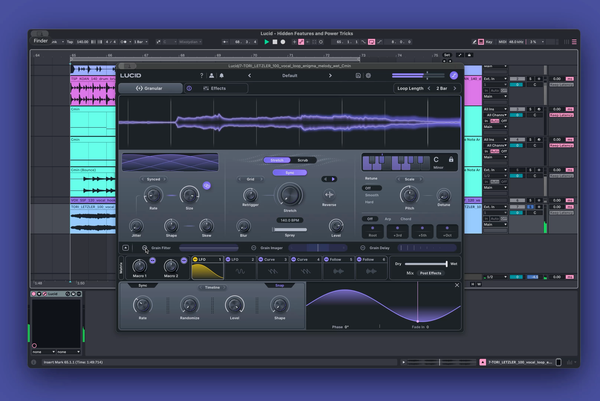

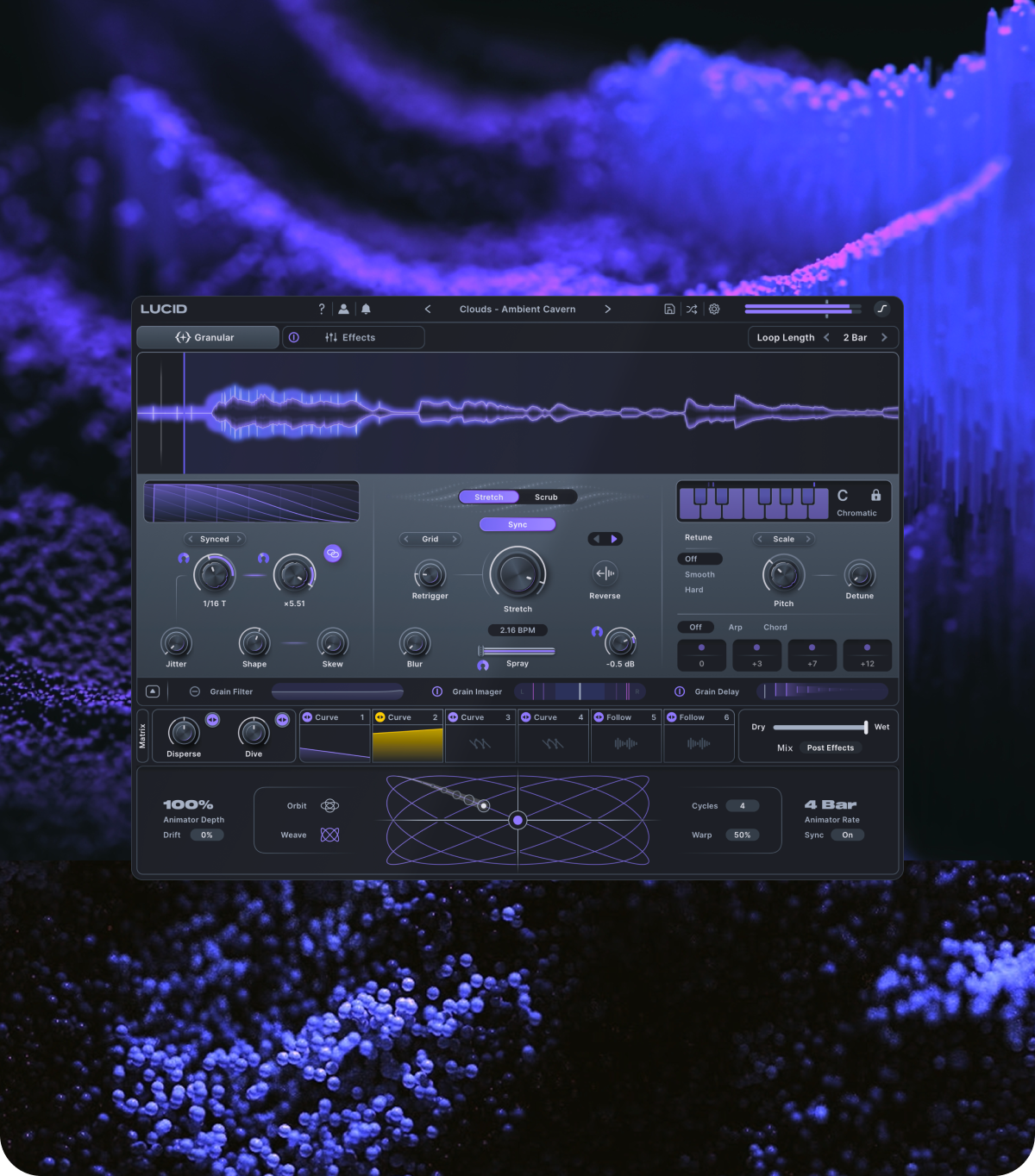
A great preset should do more than show you what a plugin can do. It should inspire what happens next in your track.
For Lucid, that meant building a factory library that could move easily between transformation and control. Sounds needed to stretch, fragment, shift, and reorganize themselves without losing the musical information that made you want to include the part in the first place.
The designers behind the plugin's preset library came at this problem from numerous directions. Some focused on pitch. Others leaned into movement, modulation, or the mechanics of the buffer itself.
Across those approaches, a few ideas kept surfacing: test everything, keep the patch musical, and leave enough room for your source material to influence the preset as much as the other way around.
We spoke to the team behind Lucid's preset library—Andrew Pals, Skxllflower, Trinist, Bop, Antithesis, and Dennis Bunton about what stood out while creating the plugin's factory content, the techniques they kept returning to, and the parts of the engine that continued revealing new possibilities as they worked.
Some of our favorites from Lucid's preset library
What immediately stood out when you started designing for Lucid?
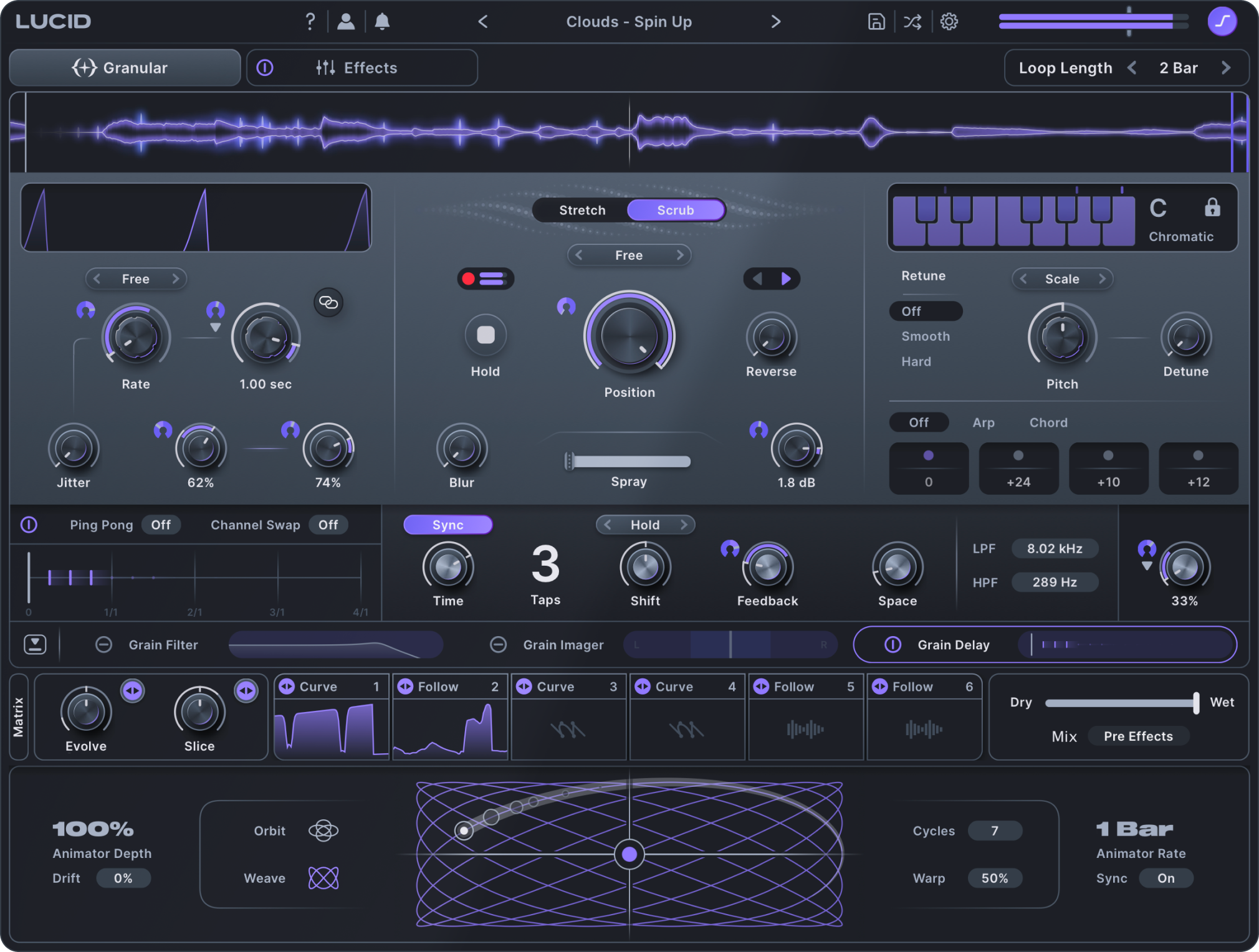
Granular processing can become complicated quickly. But for several of the designers, some of Lucid’s most interesting possibilities appeared almost immediately—especially once processing could happen at the level of the individual grain.
Lead preset designer Andrew Pals found Lucid's unique scale locking immediately inspiring and began to see the potential when paired with the plugin's per-grain effects.
"Immediately, I found Lucid unique in several of its features — honestly, a consolidated take on musicality via scale locking of the grains, and furthermore pairing deeper sound design capabilities like the grain filter with note-specific filtering and different modes like comb or flange."
Skxllflower gravitated toward the Grain Delay, Grain Filter, and Grain Imager. Rather than treating the granular engine and effects as separate stages, he found himself using the per-grain processing as the foundation of his patches.
“By far my favorite aspects that stood out to me were the per-grain integrated processing, specifically the Grain Delay, Grain Filter and Grain Imager.”
Rather than waiting until the end of a patch to start shaping the result, those controls gave him a way to change the character of the grains themselves before moving deeper into the rest of the engine.
Trinist was pulled toward the same level of control.
“I was immediately intrigued by the individual grain control with the filters, stereo imaging and all the mindbending options it offers.”
But it was the relationship between that grain processing and Lucid’s pitch system that really caught his attention.
“This together with the repitching functions for monophonic material, that was truly insane.”
For Antithesis, the introduction was a little less measured.
“The very first thing I messed around with was the per-grain filter types. I remember sitting down, setting Lucid to scrub mode, and modulating the grain size/rate while messing with those filter types, and just laughing at how insane the sounds were. Nothing I've heard before.”
Four different approaches, but the same immediate realization: once individual grains can be filtered, delayed, widened, repitched, and modulated independently, granular processing starts opening up in very different ways.
What could you make in Lucid that was difficult to keep musical in traditional granular effects?
Granular processing has always been good at destruction, but rebuilding those sounds and ensuring they're connected to the music is harder.
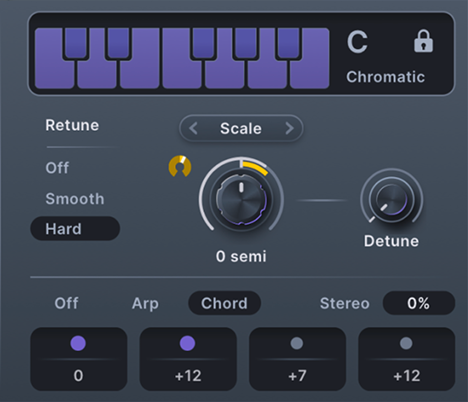
For Trinist, Lucid’s pitch correction and repitching tools changed that relationship.
“Both the built in autotune and the repitching gave me so much more control to keep it functional and efficient. I've had plenty of experience with granular plugins but never have I made sounds like the ones I made with Lucid.”
Antithesis found another version of that freedom inside the Grain Delay.
“The scale locking working in tandem with the per grain delay taps to create in key pitch shifted delay swells is huge...Usually when you are doing pitch shifted delays you are limited to working with 5ths and octaves if you want it to sound ‘in key’ but this expands the palette quite a bit.”
Andrew Pals further expands on these processes, with the addition of harmonic layering, and the utilization of Lucid's MIDI implementation.
"Absolutely. As I mentioned before, some of the main curiosity I felt within the designs myself really exists in that musical approach — whether it's dialing in harmony or utilizing the grain delay's shift parameter to harmonize additional layers, or even pushing them into the grain delay's space. You can even throw the grains themselves into MIDI or Scale mode, allowing your own MIDI to influence the grain's pitch."
That’s one of the ideas that runs through Lucid: retuning occurs before the sound becomes complicated, creating effects and transformations that wouldn’t otherwise be possible
How do you make a preset work across completely different sounds?
Lucid processing drums via manual toggling it's stretch control
This was one of the most interesting challenges for the team. A preset might sound incredible on a vocal and collapse when loaded onto a bass. Something designed around a pad might unexpectedly become much more interesting on drums.
The only way to find out is to keep experimenting.
Skxllflower built an especially systematic process around that.
“I'll bring in 3 basslines, 3 examples of drums, 3 vocals, and 3 melodic elements, and test the preset on all 12 total example sound sources. My goal is to make each preset fit at least one sound type perfectly, and two others ‘good enough.’”
That approach also shaped the way he built macros. If a huge granular wash became muddy when loaded onto bass, for example, the answer wasn’t necessarily to reduce the effect itself. A macro could instead move the feedback higher in the spectrum and adapt the patch to its new source material.
Antithesis followed a similar process, keeping a large collection of test material ready while he worked.
“When I was building presets I had a timeline filled with all kinds of different material to test the preset on. Melodic loops, drum loops, FX shots, fills, etc.”
That constant testing created some useful accidents.
“I'd find sometimes that presets I built for tonal sounds like leads and pads also happened to give really interesting character to drum loops and atonal sounds.”
Andrew Pals took a broader approach by utilizing Lucid's internal processes to adapt to the input sound rather than the other way around
"There are several great ways to have Lucid's parameter set really talk to your source sound. For one, there's Transient mode in the playback controls, which allows the freezing to react to the transient information in your sound. While that's great for drums, it's also a great way to break the grid a bit and get slightly more organic results from your source. Pair that with the Follow modulator on some elements, and you'll have pretty adaptive sounds from Lucid."
A good preset doesn’t need to behave identically on every instrument. It needs to give you enough room to find out what that sound can become.
Which techniques kept finding their way into new presets?
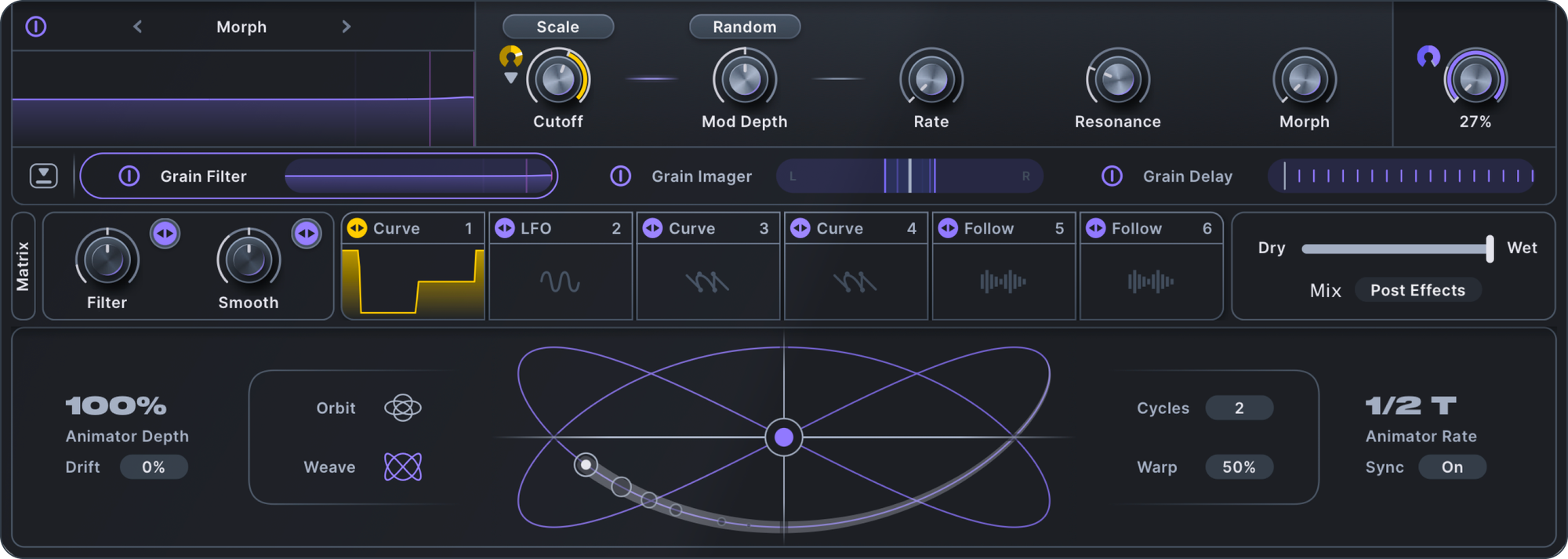
Once a sound designer spends enough time inside an effect, certain techniques start becoming part of their vocabulary.
For Bop, one of those techniques was Random modulation on the Grain Filter.
“I really like how the ‘random’ mod depth sounds on the Grain Filter. It changes the cutoff for each granule and it works wonders for ambient sounds. I used it a lot.”
He also kept returning to Scrub mode as a way of completely rearranging the original input.
“You can completely rearrange things in Scrub mode by assigning a curve or LFO to the main Position knob. It’s really useful for sequencing and flipping your sample into something completely different.”
Antithesis took that idea further, using Curve modulators almost like programmable maps for the buffer.
“One trick I became a fan of quickly was setting Lucid to ‘scrub’ mode and using the curve modulators to draw ‘sequences’ that reshuffle the source material into new patterns.”
By randomizing the phase of those curves, he could build patterns that continually changed without giving up all control over where the playhead landed.
“You can draw curves that act as ‘probabilities’ for the playhead to land on any given segment of the buffer.”
On drums, that means a randomized pattern can still be weighted toward particular kicks, snares, or other moments in the loop.
Dennis Bunton kept returning to something more immediate: the grain effects themselves.
“I kept reaching for the Reverb, Dimension, and Drive in the grain effects section. I added them to a macro, modulated them, and cranked the wet percentage so my sounds were doused in lush, crunchy, atmospheric goodness.”
What's one part of Lucid people might overlook?
Lucid processing vocals with scrub mode
Some of Lucid's deeper ideas aren't necessarily the first ones you'll reach for.
For Skxllflower, it’s buffer scrubbing.
“I wouldn't be surprised if people accidentally overlook buffer scrubbing.”
By freezing the buffer and modulating its position, a single piece of source material can be stretched into a much larger set of sounds.
“There's a lot of possibility there in generating multiple varied atmospheric beds out of just one sound source, and there's a lot of power in that.”
Trinist points toward a less obvious relationship between the Grain Filter and Lucid’s scale system.
“Maybe the function where you use the comb filter in the grain filter and sync it to the key you selected, to then use the random mod function inside the filter.”
That combination lets individual grains change while the resonant character of the filter remains connected to the selected key.
“It's such an overpowered and cool technique, but I have never seen this in any plugin so people might not even be aware of the option and power it holds.”
Bop found himself overlooking something more fundamental: just how many things inside Lucid can be modulated.
“I also think it’s easy to miss that many parameters can be modulated, even if they don’t look like they can.”
That includes things like Arp intervals and the Reverse control in Stretch mode.
He also points toward Curve modulators in Scrub mode, where a Curve can limit modulation to specific values or ranges instead of simply sweeping a control from one extreme to another.
Andrew Pals also added:
"Hopefully not the grain filter modes! We just added two more — Modal and Formant. The grain filter in Lucid alone is its own beast."
Those are small discoveries individually, but together they change the way you interact with a patch. The deeper you go, the more Lucid starts to feel less like one fixed effect and more like a collection of systems that can be connected in different ways.
So what makes Lucid different?
Checkout Lucid's plugin walkthrough and discover for yourself what makes Lucid so unique
Ask six sound designers and you'll get six different answers.
Andrew Pals offered his take on experimenting with different instances of the effect
" As with most Minimal Audio plugins, the sound design features are deep on the DSP level, but when paired with robust modulation and a stackable effects rack, it's really just a straight-up powerhouse for designing sounds. And — have you tried layering two instances of Lucid, one after another, each with slightly different intentions? Wild!"
For Dennis Bunton, it comes back to scale and randomness.
“My favorite thing is adding Scale to the filter cutoff, combined with Mod Depth Randomization. Having each grain’s pitch snap to a selectable scale is freakin’ awesome!”
For Trinist, it’s the number of directions the engine can go.
“There are definitely 30 things I can list that I absolutely love about this plugin compared to all the other granular plugins I have used in the past.”
What surprised him most was how differently Lucid could react each time he showed it to someone.
“Every time it would result in a different yet amazing sound, no matter the input material or techniques I'd use.”
And for Antithesis, the defining quality is how quickly those transformations can happen.
“I can load in almost any sound, run through the different panels in the UI and adjust parameters, and almost immediately get a mangled but musical variation on what I was working on.”
That speed has also worked its way into his production process.
“I've been using it to record multiple takes of modulation and processing, then using those takes as fills and accents on tracks.”
A drum loop becomes a granular cloud. A static sample becomes a lush atmospheric pad. A familiar sound produces something that wasn’t there a few seconds earlier. That’s ultimately what the factory library is designed to encourage.
Not simply finding a finished sound, but finding a starting point that inspires you to push further.
Open a preset. Move a macro. Freeze the buffer. Reshuffle it. Change the scale. See where it goes.
Ready to try Lucid for yourself?
If you'd like to check out some of our sound designer's music give it a spin below.